Overview
DCP Workers are software applications that connect to the DCP Scheduler, execute distributed Job Slices, and return results.
DCP Workers and their hosts form a distributed, heterogeneous pool of compute nodes operated by individuals and institutions worldwide, including universities, enterprises, and data centers. Workers participate either in the DCP Global Group (a Public Compute Group), where Jobs are scheduled broadly, or in Private Compute Groups, where Job execution is limited to explicitly authorized Workers, often within firewalled environments. All Jobs, Workers, and Compute Groups are coordinated by the central DCP Scheduler operated by Distributive.
DCP Workers run in both browser and standalone environments, with a harmonized architecture that lets developers write their Job code once and distribute it anywhere. Table 1 compares the execution environments, highlighting how the DistributiveWorker API unifies components, interfaces, and security guarantees across web and host-installed deployments.
DCP Worker
- stdio
- Syslog
- Windows event manager
- Local file
Table 1: Harmonization of DCP Worker components across browser and standalone deployments.
Core DCP Worker
At the foundation of all DCP Worker variants is DCP Client. For standalone Workers, it is distributed as the dcp-client Node.js package on npm (npmjs.com/package/dcp-client). For browser-based Workers, it is provided as a bundled JavaScript artifact (scheduler.distributed.computer/dcp-client/dcp-client.js).
DCP Client defines the canonical JavaScript execution environment and communication model shared by all DCP Worker variants, including:
- Standalone Workers
- Linux / Unix Standalone Workers
- macOS Standalone Workers
- Windows Screensaver Workers
- Android Workers
- Containerized (Docker) Workers
- Browser Workers
All DCP Worker variants are repackagings or host-specific embeddings of this same core DCP Worker, providing common baseline security guarantees.
Core Worker Architecture
The core DCP Worker application consists of:
- DistributiveWorker class: Orchestrates Job execution, communicates with the DCP Scheduler, and manages sandbox lifecycles.
- Sandboxes: Isolated execution environments in which distributed workloads are evaluated.
All Job code executes exclusively inside sandboxes. A sandbox is permanently associated with a single Job and is never reused across Jobs, eliminating cross-Job data leakage.
Sandbox Security Model
The core DCP Worker security model is based on capability elimination by design. Across all DCP Worker variants, sandboxes provide the following security guarantees:
- No file system access
- No arbitrary network access
- No access to uninitialized or shared memory
- No access to host pointers or arbitrary memory manipulation
- No ability to issue arbitrary CPU or GPU instructions or access hardware outside the sandboxed runtime
Workloads execute within a sandboxed runtime supporting JavaScript (ECMAScript), WebAssembly (Wasm), and WebGPU Shader Language (WGSL). While these languages differ in their memory models, the DCP Worker host environment exposes no filesystem access, no arbitrary networking, no direct system call access to sandboxed workloads, and no access to host memory outside the sandbox. These restrictions eliminate entire classes of memory- and I/O-based attacks independent of the execution language.
The Worker enforces lifecycle controls. Sandboxes that stall, fail to report progress, or exhibit runaway behavior are automatically terminated.
These properties hold regardless of host operating system, packaging format, or deployment environment.
Standalone Workers
Standalone Workers are host-installed deployments of the core DCP Worker, typically used by environments running continuously in the background.
Although systems integrators can write their own Standalone Worker interface using the DistributiveWorker API, all Distributive-provided Standalone Workers use the common dcp-worker Node.js package on npm – see npmjs.com/package/dcp-worker. This is the official DCP Worker program for the Distributive Compute Platform.
This package implements a DCP Worker which can be executed interactively, or as system service, using Node.js to communicate with the scheduler and control the DCP Evaluator. A companion program, the DCP Evaluator, is required to use this worker. When you install the DCP Worker with your system's package manager, the installer will automatically install the DCP Evaluator dcp-evaluator-v8. The DCP Evaluator is a secure sandboxing tool which uses Google's V8 JavaScript engine and Google's Dawn WebGPU implementation for secure execution of JavaScript, WebAssembly, and WebGPU code – see gitlab.com/Distributed-Compute-Protocol/dcp-native
You can find a complete package for Linux, macOS, and Windows, including Evaluator binaries at gitlab.com/Distributed-Compute-Protocol/dcp-native/-/releases. The project uses CMake overall, but relies on GN (with Ninja) for building V8 and related components.
Standalone Worker Architecture
The Standalone DCP Worker program consists of:
- dcp-worker: a Node.js process that communicates with the DCP Scheduler over HTTPS to obtain Job data and report results. It also manages local communication with one or more sandboxed dcp-evaluator-v8 processes over TCP. Typically, there is one dcp-evaluator-v8 process per CPU core or GPU.
- dcp-evaluator-manager (or dcp-screensaver.src Windows-only): Program which manages the launching of dcp-evaluator-v8; e.g. based on system load, terminal activity, screensaver activity, etc.
- dcp-evaluator-v8: sandboxed process that embeds Google’s V8 JavaScript engine and Dawn (Google’s WebGPU implementation) to securely execute individual tasks on the CPU or GPU as part of a distributed computation.
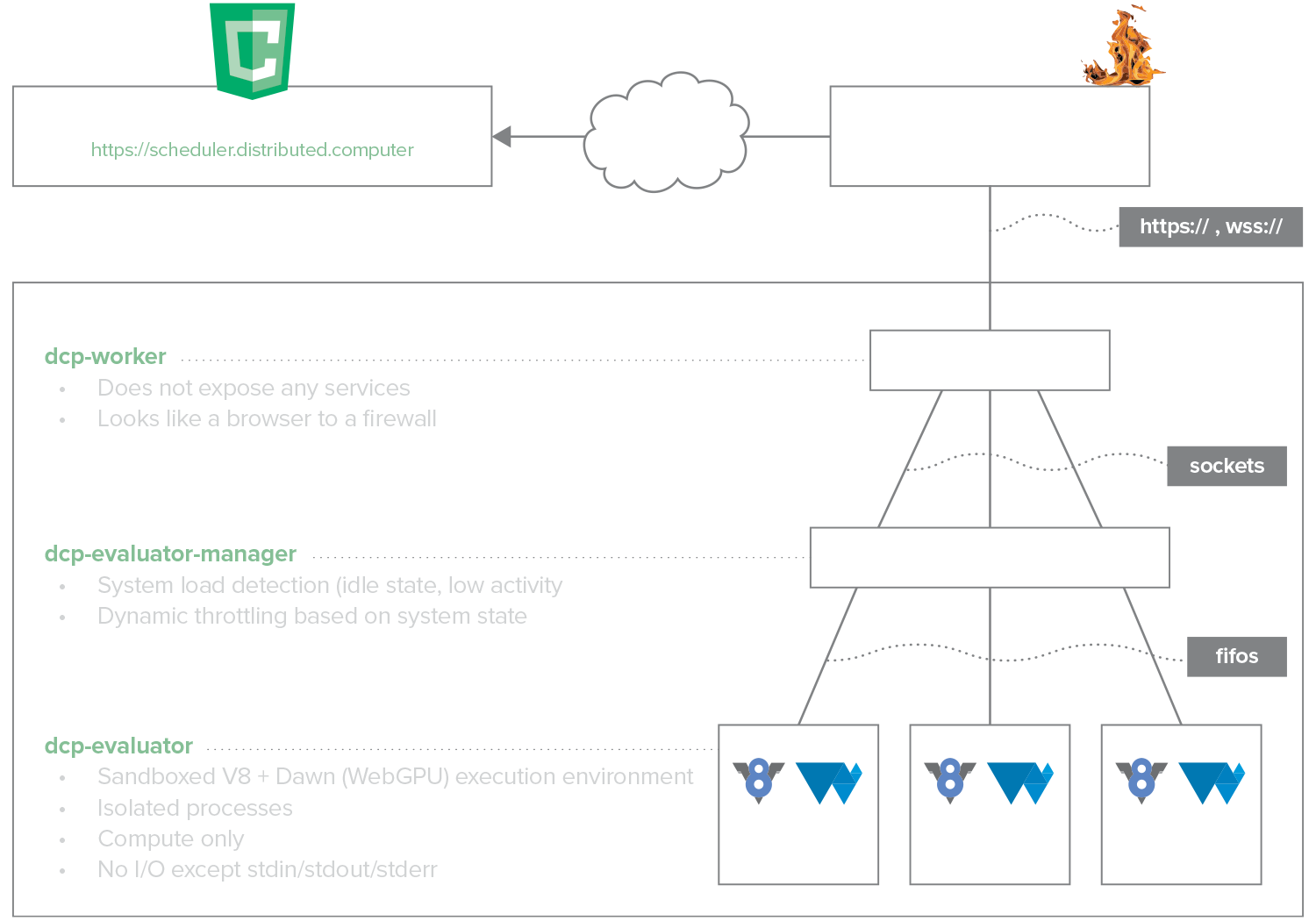
Figure 1: DCP Standalone Worker processes and security isolation model.
Manifest
Related Packages
dcp-evaluato-v8r, our isolated JS / Wasm / WebGPU evaluation environment, ships separately. Installing dcp-worker with your system's package manager will automatically install dcp-evaluator-v8 as a dependency.
Runtime & Common Properties
All Standalone and Containerized Worker variants – Linux/Unix, macOS, Windows, and Docker – share the following characteristics:
- Execute the core dcp-worker Node.js package
- Use sandboxed Google V8 + Dawn evaluators for JavaScript (ECMAScript), WebAssembly (Wasm), and WebGPU Shader Language (WGSL)
- Run as unprivileged OS users
- Communicate with the DCP Scheduler using outbound HTTPS or WSS (port 443) ● Local-only communication between DCP Worker and sandboxed evaluators uses TCP over localhost (default port 9000)
The evaluator host environment intentionally exposes only the minimal capabilities required for Job execution:
- Read input from stdin
- Write results to stdout
- Set timers and schedule callbacks
- Terminate execution
No disk I/O or arbitrary networking primitives are provided.
DCP Native v7.6.0 (Jan 2026) runtime specifications:
- Node.js: v25.2.1
- N-API version: 8
- V8: 14.1.146.11
- WebGPU: Dawn 6721
Platform-Specific Execution Considerations
While all Standalone Worker variants share the same core execution and sandbox security model, their runtime behavior and privilege enforcement are shaped by the host environment. Linux, macOS, and Windows differ in how services are launched, how privileges are constrained, and how process lifecycles are managed. Docker Workers introduce an additional containerization layer that affects deployment and resource isolation, but do not alter the underlying DCP Worker execution or security model.
As a result, Standalone Worker implementations vary in:
- Service and init systems (e.g., systemd, launchd, Windows Service Control Manager)
- Privilege and isolation mechanisms provided by the host OS or container runtime
- Lifecycle triggers and termination semantics
- Host-specific threat models and enforcement boundaries
The following sections describe these platform-specific execution models while preserving the same DCP Worker security guarantees.
 Linux / Unix Worker
Supported Platforms
Ubuntu Linux 20.04, 22.04, 24.04, 25.04, 25.10 (64-bit; x86-64, arm64)
Deployment Model
The Linux / Unix Worker is distributed as a .deb package or via Distributive’s official APT repository, providing straightforward installation and update management. It can be deployed on individual machines or scaled across institutional fleets using standard automation and configuration management tools (shell scripts, Ansible, Puppet, etc.).
Execution Model
On Linux and Unix systems, the Standalone Worker runs continuously as a system-managed service under an unprivileged system user (typically dcp). The dcp-worker package installs a dedicated user and a systemd service (dcp-worker.service) responsible for lifecycle management. The Worker is never executed with root privileges during normal operation.
systemd handles:
- Starting the Worker at boot
- Restarting the Worker on failure
- Capturing stdout/stderr logs
- Enforcing basic process isolation and resource accounting
Process and Privilege Model
All evaluator processes run as child processes of the unprivileged dcp-worker service and inherit no elevated privileges or Linux capabilities. Evaluators communicate only with the Worker service over loopback TCP. No evaluator process accepts inbound network connections, accesses the host filesystem, or executes with administrative privileges. The runtime process hierarchy on Linux is:
systemd └── dcp-worker (Node.js, unprivileged user) └── dcp-evaluator-8 (one per CPU core and GPU)
Resource Scheduling and Isolation
Process scheduling and resource allocation are entirely delegated to the host operating system. By default, the Worker will make all detected CPU cores and GPUs available for computation. Administrators may restrict resource usage via: ● ●
- Command-line flags (-c cpuCount,gpuCount)
- systemd service configuration (e.g., CPU quotas, cgroups)
- Standard OS-level scheduling and policy controls
- dcp-config set in /etc/dcp/dcp-worker/dcp-config.js (see examples/dcp-config.js in the dcp-worker package (https://www.npmjs.com/package/dcp-worker)
- Through the dcp.cloud portal for registered workers
Operational Characteristics
Linux / Unix Standalone Workers are typically used for:
- Institutional or enterprise deployments on desktops or servers
- Continuous background execution for CPU- and GPU-based distributed computation
- Scavenging idle compute cycles in multi-tenant environments
They preserve the same core sandboxing and security properties as other DCP Worker variants, while leveraging the host OS’s service management and privilege model (systemd, unprivileged users) to manage lifecycle, isolation, and resource allocation.
 macOS Worker
Supported Platforms
macOS 14, 15, 26 (64-bit; x86-64, arm64)
Deployment Model
The macOS Standalone Worker is distributed as a .pkg installer for Intel (x64) and Apple Silicon (arm64) machines. Installation sets up the Worker as an unprivileged system user and registers a launchd service for lifecycle management. Workers can be installed on individual machines or deployed at scale across institutional fleets using standard macOS automation and configuration management tools (shell scripts, Jamf, Munki, etc.).
Execution Model
macOS Standalone Workers follow the same execution and privilege model as Linux / Unix Workers, using launchd in place of systemd.
Operational Characteristics
macOS Standalone Workers run continuously in the background under launchd, which manages startup, restarts, and logging. They preserve the same core sandboxing and security guarantees as other DCP Worker variants, executing workloads inside isolated evaluator processes. Typical use cases include:
- Institutional or enterprise deployments reclaiming idle CPU and GPU resources
- CPU and GPU cycle-scavenging compute pools
- Continuous background evaluation of interruptible workloads
 Windows Screensaver Worker
Supported Platforms
Windows 10 & 11 (64-bit; x86-64)
Deployment Model
The Windows Screensaver Worker is distributed as an MSI package with required registry configuration and can be deployed on individual computers centrally at scale using standard enterprise tooling such as Microsoft Endpoint Configuration Manager (SCCM), Intune, NinjaOne, or PowerShell scripts.
Execution Model
The Windows Screensaver Worker uses a Windows-specific execution and privilege model. While it shares the same DCP Worker and evaluator sandbox guarantees as other Standalone Workers, its execution lifecycle, process hierarchy, and privilege enforcement are implemented using native Windows service, screensaver, and restricted-token mechanisms.
Process and Privilege Model
All evaluator processes inherit a restricted security token and communicate only with the local Worker service over loopback TCP. No evaluator process accepts inbound network connections or executes with administrative privileges. The process tree for dcp-screensaver looks like this:
dcp-screensaver: | node.exe (dcp-worker) | dcp-evaluator-start (dispatcher) [listens on port 9000, locally] | dcp-evaluator-v8 (v8-evaluator) | dcp-evaluator-v8 (v8-evaluator) | dcp-evaluator-v8 (v8-evaluator) | ...
When the screensaver exits, the evaluator sandboxes terminate immediately, abandoning in-progress tasks. The Worker may submit completed results before returning to an idle state.
Table 2: Service Accounts and Privilege Model (Windows-specific)
Operational Characteristics
Windows Screensaver Workers are typically used for:
- Individual or home users contributing idle CPU and GPU resources
- Institutional or enterprise deployments reclaiming idle CPU and GPU resources
- Interruptible batch workloads
They preserve the same core sandboxing and security properties as other DCP Worker variants, while leveraging the Windows screensaver subsystem as a native idle-state trigger for workload execution.
 Docker Worker
Supported Platforms
Docker-compatible hosts, including Docker Desktop on macOS and Windows (64-bit; x86-64, arm64)
Deployment Model
The Docker Worker is distributed as a pre-built container image (distributivenetwork/dcp-worker) and can be deployed on individual hosts using Docker or at scale using container orchestration platforms such as Kubernetes or OpenShift. For orchestrated deployments, Workers are typically launched via declarative configuration (e.g., YAML manifests or generated deployment templates) and managed using standard container lifecycle and scheduling mechanisms. A YAML manifest generator is available to simplify creating deployment templates for large-scale or private compute group deployments.
Execution Model
The Docker Worker executes inside a Linux container managed by the host’s container runtime. The container packages the same dcp-worker and sandboxed evaluator binaries used by Standalone Workers, providing a consistent and reproducible runtime environment across hosts.
Docker provides packaging, dependency isolation, and deployment portability. It does not alter the DCP Worker execution or sandbox security model; it adds an additional isolation boundary enforced by the container runtime.
Process and Isolation Model
All evaluator processes run inside the container under an unprivileged user and inherit no elevated privileges. Evaluators communicate exclusively with the Worker over container-local networking (loopback).
All sandbox security guarantees described in the Core DCP Worker Security Model apply unchanged. Docker adds an additional isolation boundary enforced by the container runtime (Linux namespaces and cgroups) but does not modify the Worker’s execution or sandbox security model. Filesystem access is limited to explicitly mounted volumes, if any, and evaluator sandboxes operate entirely within the container boundary.
Resource Scheduling
CPU, memory, and GPU resource allocation are governed by the container runtime and host operating system.
- CPU and memory limits may be enforced via container runtime configuration.
- GPU access is mediated through the host’s GPU drivers and container runtime (e.g., NVIDIA Container Toolkit).
- The DCP Worker does not install kernel modules or modify host system configuration.
By default, the Worker will make all container-visible CPU cores and GPUs available for computation unless constrained by runtime configuration or Worker flags.
Operational Characteristics
Docker Workers are typically used for:
- Cloud and data-center deployments
- Ephemeral or auto-scaled compute pools
- Environments favoring immutable infrastructure and declarative orchestration
They preserve the same core sandboxing and security properties as other DCP Worker variants, with containerization providing standardized packaging and deployment rather than altering the execution or security model.



 Browser Workers
Supported Platforms
Chrome, Firefox, Safari, Edge, Opera, Brave (64-bit; x86-64, arm64)
Deployment Model
Browser Workers are embedded into webpages using the DistributiveWorker API. Any host visiting a page containing the embedded Worker will execute it within their browser context. This enables instant, zero-install deployment across individual users, home computers, institutional desktops, or cloud-hosted web apps.
Examples:
- Vanilla JavaScript integration: dcp.network
- React integration: dcp.work
Execution Model
Browser Workers are deployments of the core DCP Worker within a web browser environment. They require no installation and execute entirely within the browser’s security and isolation model.
In browser deployments:
- The Worker runs as browser-hosted JavaScript rather than as a Node.js process.
- Evaluators execute within browser-managed execution contexts using the browser’s native JavaScript engine and WebGPU implementation.
The browser itself provides process isolation, scheduling, and lifecycle management in place of system services such as systemd, but does not provide any automated load management.
Process and Isolation Model
All evaluator execution occurs within browser-isolated worker contexts and inherits the browser’s security restrictions. Evaluators communicate only with the browser-hosted Worker via in-memory message channels (PostMessage) provided by the browser runtime as depicted in Figure 2.
The evaluator context:
- Doesn’t have access to the local filesystem
- Cannot initiate arbitrary network connections
- Cannot access host memory outside the sandbox
- Cannot execute native system calls or privileged instructions
To align browser execution with the same sandbox guarantees enforced by Standalone Workers, selected browser APIs (such as fetch) are explicitly removed or not exposed to Job execution contexts.
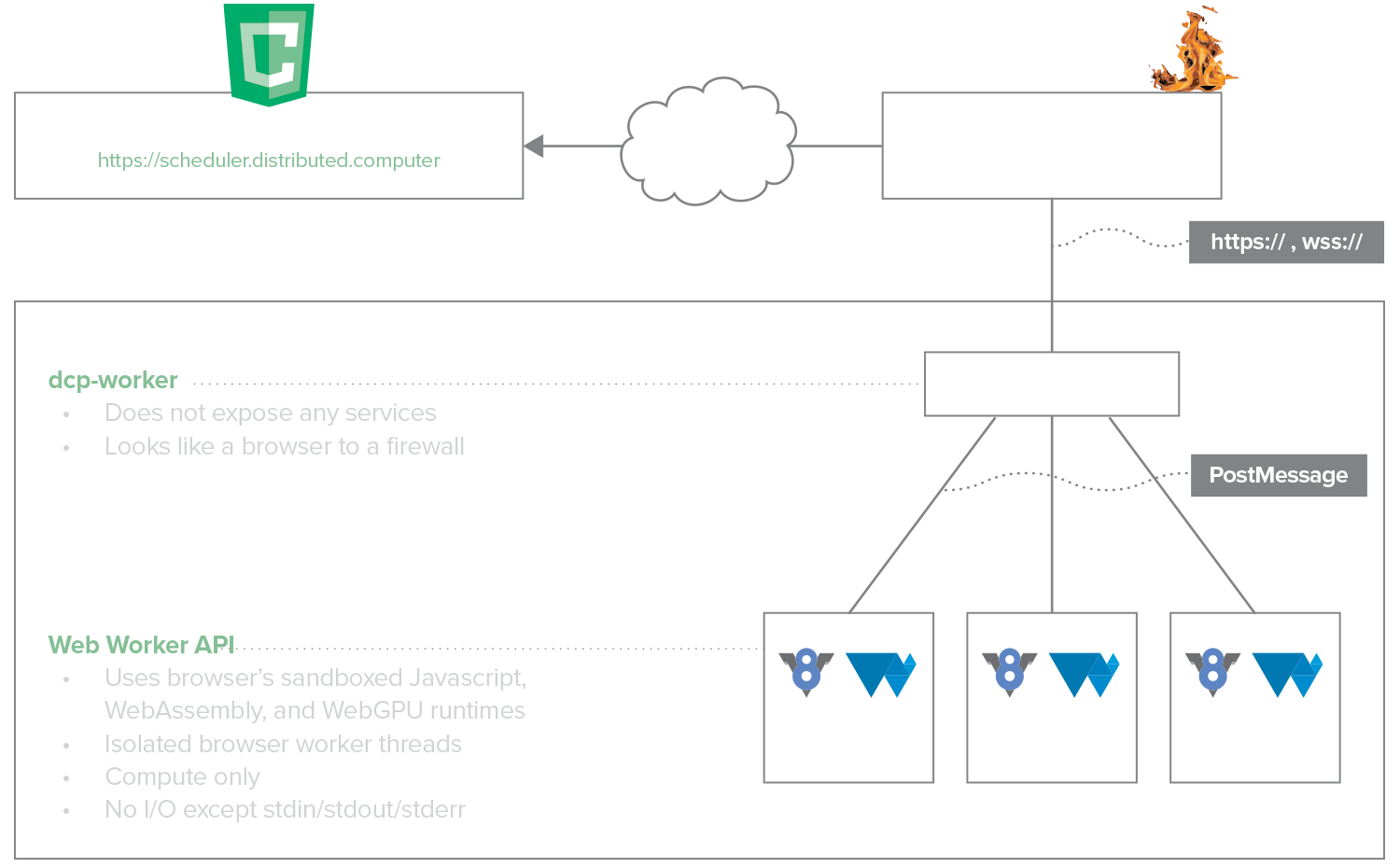
Figure 2: DCP Browser Worker process and security isolation model.
Runtime and Acceleration
Browser Workers rely on:
- The browser’s JavaScript engine (e.g., V8, SpiderMonkey, JavaScriptCore) for ECMAScript execution
- The browser’s WebAssembly runtime for Wasm execution
- The browser’s WebGPU implementation (e.g., Dawn, wgpu, WebKit WebGPU) for GPU acceleration
GPU execution is mediated entirely by the browser and underlying graphics driver stack; no direct device access is exposed to Job code.
Operational Characteristics
Browser Workers preserve the same core execution and sandboxing guarantees as Standalone Workers but differ operationally:
- Execution is ephemeral and tied to the browser session.
- Resource availability is governed by browser policies and user activity.
Browser Workers are typically used for ad hoc, volunteer, or opportunistic compute rather than persistent, managed deployments.